Class / Object
ภาควิชาวิศวกรรมคอมพิวเตอร์
จุฬาลงกรณ์มหาวิทยาลัย
๒๕๖๒
จุฬาลงกรณ์มหาวิทยาลัย
๒๕๖๒
ประเภทข้อมูล
•
ที่ผ่านมา ถ้าข้อมูลเป็น
–
จำนวน
ใช้
int
หรือ
float
–
ข้อความ ใช้
str
–
จริง/เท็จ ใช้
boolean
–
กลุ่มข้อมูล ใช้
list, set, tuple, dict
–
ข้อมูลที่ประกอบด้วยข้อมูลย่อย ๆ ที่สัมพันธ์กัน
•
ใช้
list, tuple, dict
บัตรประชาชน
-
หมายเลข
- ชื่อ-สกุล
- ที่อยู่
- วันเกิด
- ...
หนังสือ
-
ชื่อ
- หมายเลข ISBN
- ราคา
- สำนักพิมพ์
- ...
2110101 วิศวกรรมคอมพิวเตอร์ จุฬาฯ (14/09/67)
3
ใช้ tuple เก็บรายละเอียดต่าง ๆ ของหนังสือ 1 เล่ม
b1 = ("Data Science", "149190142X", 28.79)
b2 = ("Learning Python", "1449355730", 37.06)
b3 = ("Data Analysis", "1449319793", 27.68)
print(total_price( [b1, b2, b3] )
หนังสือ
-
ชื่อหนังสือ
- หมายเลข ISBN
- ราคา
def total_price( books ):
s = 0
for b in books:
s +=
b[2]
return s
def total_price( books ):
s = 0
for title, isbn,
price
in books:
s += price
return s
2110101 วิศวกรรมคอมพิวเตอร์ จุฬาฯ (14/09/67)
4
ใช้ dict เก็บรายละเอียดต่าง ๆ ของหนังสือ 1 เล่ม
b1 = {
"title"
:
"Data
Science"
,
"isbn"
:
"1408142X"
,
"price"
:
28.79
}
b2 = {
"title"
:
"Easy
Python"
,
"isbn"
:
"14455730"
,
"price"
:
37.06
}
b3 = {
"title"
:
"Big
Data"
,
"isbn"
:
"14493793"
,
"price"
:
27.68
}
print(total_price( [b1, b2, b3] )
หนังสือ
-
ชื่อหนังสือ
- หมายเลข ISBN
- ราคา
def total_price( books ):
s = 0
for b in books:
s +=
b[
"price"
]
return s
2110101 วิศวกรรมคอมพิวเตอร์ จุฬาฯ (14/09/67)
5
อีกแบบ: ใช้ class สร้างประเภทข้อมูลใหม่
class Book:
pass
def init(
b
, title, isbn, price):
b.title
= title
b.isbn
= isbn
b.price
= price
b1
= Book()
init(
b1
,
"Data Science", "149142X", 28.79)
หนังสือ
-
ชื่อหนังสือ
- หมายเลข ISBN
- ราคา
b.title
คือ ตัวแปร
title
ของอ็อบเจกต์
b
self
คือ อ็อบเจกต์
ที่เพิ่งถูกสร้าง
คลาส (class) คือประเภทข้อมูล
อ็อบเจกต์ (object) คือตัวข้อมูล
ไม่เขียนแบบนี้
class Book:
def
__init__
(
self
, title, isbn, price):
self
.title
= title
self
.isbn
= isbn
self
.price
= price
b1
= Book("Data Science", "149142X", 28.79)
b1
title
isbn
price
2110101 วิศวกรรมคอมพิวเตอร์ จุฬาฯ (14/09/67)
6
แต่ละอ็อบเจกต์มีตัวแปรประจำอ็อบเจกต์ของตัวเอง
b1 =
Book
(
"Data Science"
,
"149190142X"
, 28.79)
b2 =
Book
(
"Learning Python"
,
"1449355730"
, 37.06)
b3 =
Book
(
"Data Analysis"
,
"1449319793"
, 27.68)
b1
title
isbn
price
"149190142X"
28.79
"Data Science"
b2
title
isbn
price
"1449355730"
37.06
"Learning Python"
b3
title
isbn
price
"1449319793"
27.68
"Data Analysis"
2110101 วิศวกรรมคอมพิวเตอร์ จุฬาฯ (14/09/67)
7
ตัวอย่าง : คลาสที่แทนประเภทข้อมูล
class
Point:
def __init__(self,
):
self.x
= x
self.y
= y
class
Song:
def __init__(self, ):
self.title
= title
self.artist
= artist
self.lyrics
= lyrics
self.nviews
= 0
class
Date:
def __init__(self, ):
self.day
= d
self.month
= m
self.year
= y
x, y
d, m, y
title, artist, lyrics
p = Point(10, 23)
d = Date(14, 2, 2562)
x = Song("Hello", "Adele", "")
2110101 วิศวกรรมคอมพิวเตอร์ จุฬาฯ (14/09/67)
8
ตัวอย่าง : คลาสที่แทนประเภทข้อมูล
class
BankAccount:
def __init__(self, acc_no, acc_name, balance):
self.acc_no
= acc_no
self.acc_name
= acc_name
self.balance
= balance
class Rectangle:
def __init__(self, lower_left, w, h):
self.lower_left
= lower_left
self.height
= h
self.width
= w
class Course:
def __init__(self, ID, name):
self.ID = ID
self.name = name
self.students
= []
2110101 วิศวกรรมคอมพิวเตอร์ จุฬาฯ (14/09/67)
9
การใช้ตัวแปรในอ็อบเจกต์
class Point:
def __init__(self, x, y):
self.x
= x
self.y
= y
class Circle:
def __init__(self, p, r):
self.center
= p
self.radius
= r
c = Circle( , 100 )
c.radius
= 200
c.center
= Point(2, 4)
c.center.x
= 3
center
x
y
c
center
radius
Point(20,30)
หน้าจุดเป็นอ็อบเจกต์
อ็อบเจกต์
.
ชื่อตัวแปรในอ็อบเจกต์
2110101 วิศวกรรมคอมพิวเตอร์ จุฬาฯ (14/09/67)
10
การใช้ตัวแปรในอ็อบเจกต์
class Book:
def __init__(self, title, isbn, price):
self.title
= title
self.isbn
= isbn
self.price
= price
b1 = Book("Data Science", "149190142X", 28.79)
print( b1.title
)
b1.price
*= 0.80
อ็อบเจกต์
.
ชื่อตัวแปรในอ็อบเจกต์
2110101 วิศวกรรมคอมพิวเตอร์ จุฬาฯ (14/09/67)
11
ตัวอย่างการใช้ตัวแปรในอ็อบเจกต์
def total_price( books ):
s = 0
for book in books:
s += book.price
return s
class Book:
def __init__(self, title, isbn, price):
self.title
= title
self.isbn
= isbn
self.price
= price
b1 = Book("Data Science", "149190142X", 28.79)
b2 = Book("Learning Python", "1449355730", 37.06)
b3 = Book("Data Analysis", "1449319793", 27.68)
print( total_price(
[b1, b2, b3]
) )
2110101 วิศวกรรมคอมพิวเตอร์ จุฬาฯ (14/09/67)
12
ตัวอย่างการใช้ตัวแปรในอ็อบเจกต์
def discount( books, p ):
for b in books:
b.price
*= (1 -
p/100)
class Book:
def __init__(self, title, isbn, price):
self.title
= title
self.isbn
= isbn
self.price
= price
def get_min_price( books ):
return min([b.price
for b in books])
def search( books, isbn
):
for b in books:
if isbn
== b.isbn: return b
return None
กำหนดให้
books
คือ ลิสต์ที่เก็บอ็อบเจกต์ของ
Book
2110101 วิศวกรรมคอมพิวเตอร์ จุฬาฯ (14/09/67)
13
การเพิ่มบริการให้เรียกใช้กับอ็อบเจกต์
class Point:
def __init__(self, x, y):
self.x
= x
self.y
= y
def distance(p1, p2):
dx = p1.x -
p2.x
dy
= p1.y -
p2.y
return (dx**2+dy**2)**0.5
def to_str(p):
return "(" + str(p.x) + \
"," + str(p.y) + ")"
p1 = Point(2,4)
p2 = Point(3,5)
d = distance(p1, p2)
print( to_str(p1), to_str(p2) )
class Point:
def __init__(self, x, y):
self.x
= x
self.y
= y
def distance(self, p):
dx = self.x
-
p.x
dy
= self.y
-
p.y
return (dx**2+dy**2)**0.5
def to_str(self):
return "(" + str(self.x) + \
"," + str(self.y) + ")"
p1 = Point(2,4)
p2 = Point(3,5)
d = p1.distance(p2)
print( p1.to_str(), p2.to_str() )
functions
methods
อ็อบเจกต์
.
ชื่อเมท็อด
(
...
)
2110101 วิศวกรรมคอมพิวเตอร์ จุฬาฯ (14/09/67)
14
อ็อบเจกต์ที่ self อ้างอิง
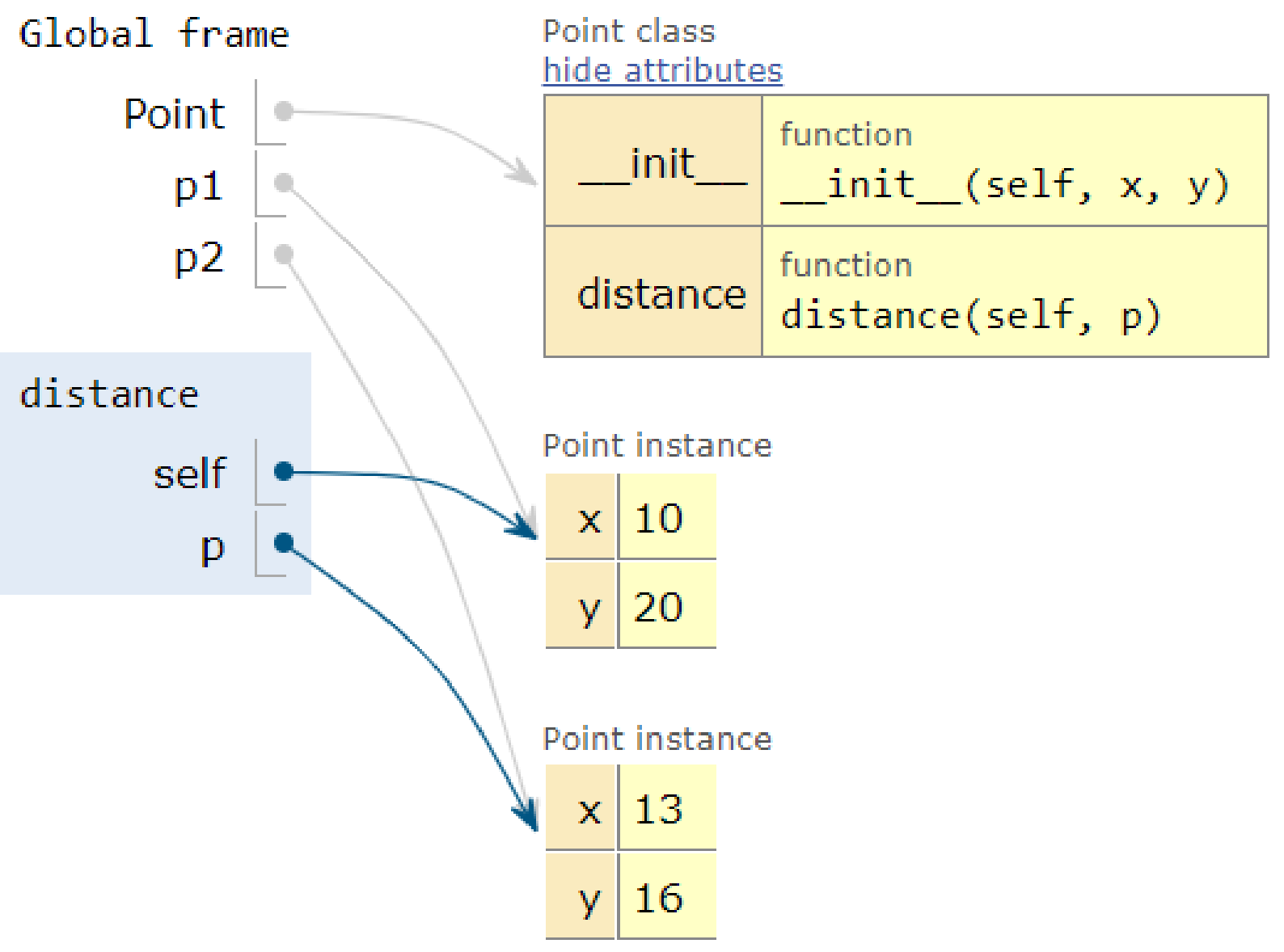
class Point:
def
distance
(self, p):
dx = self.x
-
p.x
...
d = p1.
distance
(p2)
2110101 วิศวกรรมคอมพิวเตอร์ จุฬาฯ (14/09/67)
15
เคยใช้ฟังก์ชันกับเมท็อดมามากมาย
a = [1,2,3,4]
a.sort()
a.append(99)
t = "aBc"
u =
t.upper()
v =
t.lower()
k =
t.find("B")
s = set(a)
s =
s.union([3,5])
a = [1,2,3,4]
k =
len(a)
print(a)
s =
sum(a)
b =
sorted(a)
#
ฟังก์ชันใน
module
อื่น
k = math.
sin(1)
d = np.
ndarray((2,3))
functions
methods
2110101 วิศวกรรมคอมพิวเตอร์ จุฬาฯ (14/09/67)
16
ตัวอย่าง : BankAccount
•
คลาส BankAccount แทนบัญชีธนาคาร
–
หมายเลขบัญชี (acc_no)
–
ชื่อบัญชี (acc_name)
–
ยอดเงินปัจจุบัน (balance)
•
เมท็อดสำหรับ BankAccount
–
ฝาก
: deposit( amount )
–
ถอน
: withdraw( amount )
a1 = BankAccount("1-034-567-892",
"
ปราณี รักเรียน
", 500)
a1.deposit(1000)
a1.withdraw(150)
2110101 วิศวกรรมคอมพิวเตอร์ จุฬาฯ (14/09/67)
17
ตัวอย่าง : BankAccount มีบริการฝาก/ถอน
กด Run เพื่อดูยอดเงินหลังฝากและถอน — ลองแก้จำนวนเงินดู
2110101 วิศวกรรมคอมพิวเตอร์ จุฬาฯ (14/09/67)
18
การเรียกใช้เมท็อดภายในคลาสเดียวกัน
class BankAccount:
...
def deposit(self, amount):
...
def withdraw(self, amount):
...
def transfer_to(self, acc, amount):
if 0 <= amount <= self.balance:
self.withdraw( amount )
acc.deposit( amount )
2110101 วิศวกรรมคอมพิวเตอร์ จุฬาฯ (14/09/67)
20
การเรียกฟังก์ชันภายในคลาสเดียวกัน
class Rational:
def __init__(self, n, d):
self.n
= n # numerator
เศษ
self.d
= d # denominator
ส่วน
r1 = Rational( 1, 2 ) #
เก็บ
1/2
r2 = Rational( 4, 8 ) #
เก็บ
4/8
2110101 วิศวกรรมคอมพิวเตอร์ จุฬาฯ (14/09/67)
21
การเรียกฟังก์ชันภายในคลาสเดียวกัน
class Rational:
def __init__(self, n, d):
g = Rational.gcd(n, d)
self.n
= n # numerator
เศษ
self.d
= d # denominator
ส่วน
def gcd(a, b):
while b != 0:
a, b = b, a%b
return a
r1 = Rational( 1, 2 ) #
เก็บ
1/2
r2 = Rational( 4, 8 ) #
เก็บ
//g
//g
1/2
ชื่อคลาส
.
ชื่อเมท็อด
(...)
2110101 วิศวกรรมคอมพิวเตอร์ จุฬาฯ (14/09/67)
22
ตัวอย่าง: จำนวนตรรกยะ
class Rational:
def gcd(a, b):
while b != 0:
a,b
= b,a%b
return a
def __init__(self, n, d):
g = Rational.gcd(n, d)
self.n
= n//g # numerator
เศษ
self.d
= d//g # denominator
ส่วน
def mult(self, x):
n = self.n
* x.n
d = self.d
* x.d
return Rational(n, d)
def add(self, x):
d = self.d
* x.d
n = self.n
* x.d
+ x.n
* self.d
return Rational(n, d)
def to_float(self):
return self.n
/ self.d
def less_than(self, x):
return self.to_float() < x.to_float()
def to_str(self):
return str(self.n) + "/" + str(self.d)
r1 = Rational(20,40)
r2 = Rational(1,4)
r3 = r1.add(r2)
print(r3.to_str())
r4 = r1.mult(r2)
print(r4.to_str())
print(r3.less_than(r4))
อยากเขียน
r3 = r1 + r2
print( str(r3) )
r4 = r1 * r2
print( r3 < r4 )
ทำไง
?
2110101 วิศวกรรมคอมพิวเตอร์ จุฬาฯ (14/09/67)
23
เมท็อดพิเศษของคลาสที่ทำให้ใช้งานง่าย
class Rational:
def __init__(self, n, d):
g = Rational.gcd(n, d)
self.nu = n//g # numerator
เศษ
self.de = d//g # denominator
ส่วน
def
__add__
(self, x):
...
def
__mul__
(self, x):
...
def
__float__
(self):
...
def
__lt__
(self, x):
...
def
__str__
(self):
...
class Rational:
def __init__(self, n, d):
g = Rational.gcd(n, d)
self.nu = n//g # numerator
เศษ
self.de = d//g # denominator
ส่วน
def add(self, x):
...
def mult(self, x):
...
def to_float(self):
...
def less_than(self, x):
...
def to_str(self):
...
r3 = r1 + r2
print( str(r3), float(r3) )
r4 = r1 * r2
print( r3 < r4 )
r3 = r1.add(r2)
print(to_str(r3), to_float(r3) )
r4 = r1.mult(r2)
print( r3.less_than(r4) )
2110101 วิศวกรรมคอมพิวเตอร์ จุฬาฯ (14/09/67)
24
ตัวอย่าง: เมนูอาหาร และการสั่งอาหาร
class Item:
def __init__(self, name, price):
self.name = name
self.price
= price
menu = [ Item("Fried rice", 45),
Item("Phat thai", 50),
Item("Congee", 30),
Item("Papaya salad", 40) ]
2110101 วิศวกรรมคอมพิวเตอร์ จุฬาฯ (14/09/67)
25
ตัวอย่าง: เมนูอาหาร และการสั่งอาหาร
class Order:
def __init__(self):
self.order_items
= []
self.paid
= False
def add(self, item, n):
for i
in range(n):
self.order_items.append(item)
def total(self):
s = 0
for item in self.order_items:
s += item.price
return s
o1 = Order();
o1.add(menu[0], 2);
o1.add(menu[3], 1)
menu = [ Item("Fried rice", 45),
Item("Phat thai", 50),
Item("Congee", 30),
Item("Papaya salad", 40) ]
ข้าวผัดสอง ส้มตำหนึ่ง
2110101 วิศวกรรมคอมพิวเตอร์ จุฬาฯ (14/09/67)
26
ตัวอย่าง: สั่งอาหาร, จ่ายเงิน, รายรับรวม
def get_total(orders):
return sum( [od.total() for od in orders if od.paid] )
class Item:
def __init__(self, name, price):
self.name = name
self.price
= price
class Order:
def __init__(self):
self.order_items
= []
self.paid
= False
def add(self, item, n):
for i
in range(n):
self.order_items.append(item)
def total(self):
return sum([item.price
for item in self.order_items])
m = [ Item("Fried rice", 45),
Item("Phat thai", 50),
Item("Congee", 30),
Item("Papaya salad", 40) ]
o1 = Order()
o1.add(m[0],2); o1.add(m[3],1)
o2 = Order();
o2.add(m[0],1); o2.add(m[1],2)
o3 = Order();
o3.add(m[1],1); o3.add(m[2],1)
orders = [o1, o2, o3]
o1.paid = True
o2.paid = True
print(get_total(orders))
2110101 วิศวกรรมคอมพิวเตอร์ จุฬาฯ (14/09/67)
27
เติม __lt__ และ __str__ ให้ Item
class Item:
def __init__(self, name, price):
self.name = name
self.price
= price
def __lt__(self, rhs):
return self.price
< rhs.price
def __str__(self):
return self.name + ":" + str(self.price)
x1 = Item("Congee", 30)
x2 = Item("Phat thai", 50)
print(x1 < x2) # True
print(x2 < x1) # False
print(str(x1), str(x2)) # Congee:30 Phat thai:50
print(x1, x2) # print
จะไปเรียก
str
ให้
เปรียบเทียบด้วย
ราคาอาหาร
2110101 วิศวกรรมคอมพิวเตอร์ จุฬาฯ (14/09/67)
28
sort ใช้ __lt__ ในการเรียงลำดับข้อมูล
menu = [ Item("Fried rice", 45),
Item("Phat thai", 50),
Item("Congee", 30),
Item("Papaya salad", 40) ]
menu.sort()
for item in menu:
print(item)
Congee:30
Papaya salad:40
Fried rice:45
Phat thai:50
2110101 วิศวกรรมคอมพิวเตอร์ จุฬาฯ (14/09/67)
29
ตัวอย่าง : Date
กด Run — __lt__ ทำให้เปรียบเทียบได้ __str__ ทำให้ print อ่านรู้เรื่อง
2110101 วิศวกรรมคอมพิวเตอร์ จุฬาฯ (14/09/67)
30